Lock any Android device to your website or your apps.
Choose Kiosk Browser for locking down websites or Kiosk Launcher for locking down a single app or multiple applications. Great for creating public kiosks, interactive digital signage and more.
Need a website and a few apps? Choose Kiosk Launcher. Its built-in browser can lock to your authorised URLs as well as your apps.
Features
70+ settings to control every aspect of your kiosk.
Every feature is included in both free trials. After the trial, each device needs a licence or a Remote Management subscription, for personal and commercial use alike.
What your users see on the device. Click a screenshot to see it full size.
Locked to your websiteYour web app runs full screen, with the toolbar under your control.
Apps and websites togetherShow approved apps next to website shortcuts on one locked home screen.
Hi there
Welcome to your device
×6
Start
1 Tap the welcome screen 6 times
Scan QR code
2 Scan your provisioning QR code
Kiosk Browser
Device owner
3 Installed and locked down
Provisioning devices
Locked down in the most secure way possible.
When provisioning a device using our provisioning process, Kiosk Browser/Kiosk Launcher becomes the “device owner” meaning that it is granted more permissions vs a standard installation.
Streamlined setup process (embed licence keys or remote management registration key)
Set the default launcher programmatically without user intervention
Hide home button (KB only) and recents button
Update Kiosk Browser/Kiosk Launcher without visiting your devices (via remote management)
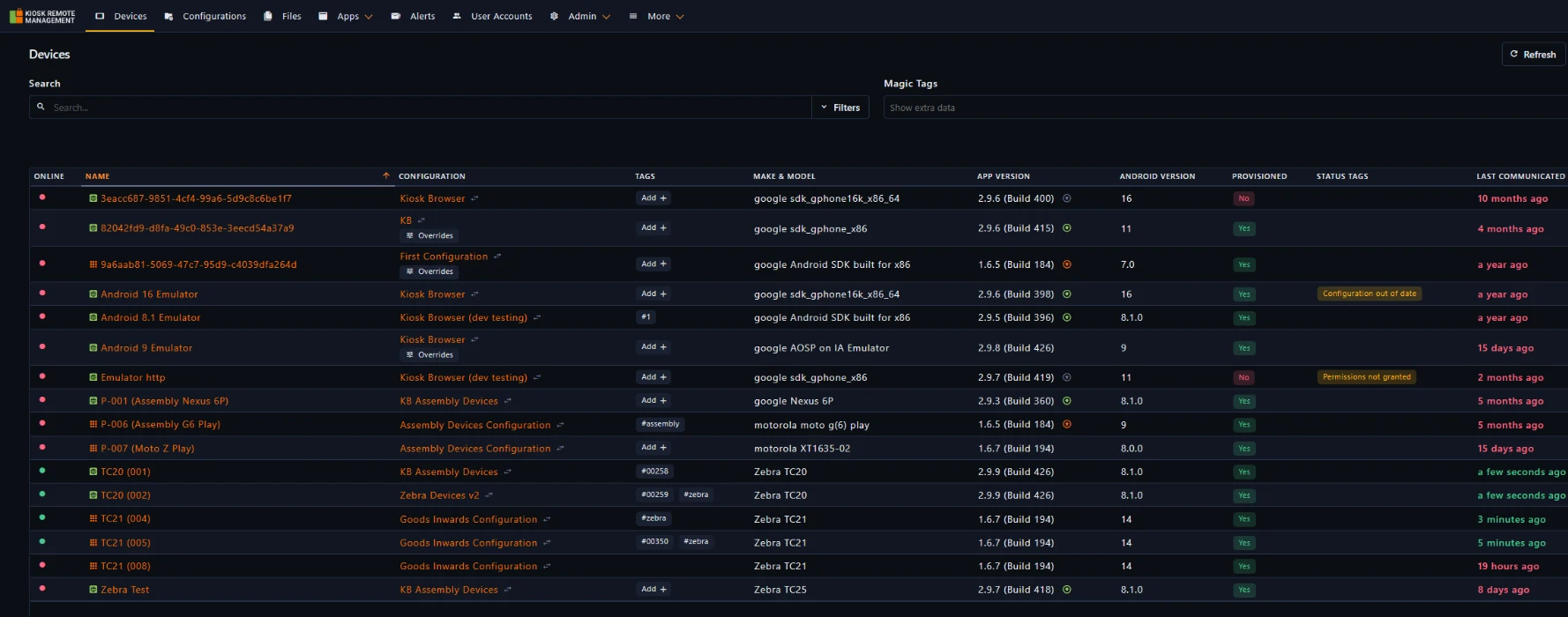
Our web based remote management console provides central management functions for all your Kiosk Browser/Kiosk Launcher devices, from one console. Devices added to Remote Management automatically have access to all features and functionality.
Start free 14 day trial Unrestricted, no payment details required, and no obligation to subscribe once the trial ends.
Configurations
Build a Configuration once and push the same settings to all assigned devices.
App Grid
Manage installs, upgrades and uninstalls via a single grid for a large or small number of devices, including updates to Kiosk Browser and Kiosk Launcher themselves. Progress is displayed in near real time.
Device Actions
Run actions on a device straight away, such as restarting the app or rebooting the device (reboot needs a QR provisioned device).
Email Alerts
Get an email when a device goes offline, is unplugged, or its battery drops below a level you choose.
Device Map & Screenshots
See where your devices are, with location history for each one. On Kiosk Browser, you can also request a screenshot to check what is on screen.
REST API
REST API for Kiosk Remote Management, so you can drive your fleet from your own systems.
Non-profit or education? We offer a 40% discount on annual subscriptions for all non-profits, including educational establishments.Contact our sales team
[[ price.quantity ]] licence[[ price.quantity > 1 ? 's' : '' ]] at [[ money(price.netprice, price.currency) ]] each, excluding VAT. Any VAT is added at checkout.
Fetching price...
Buying for an organisation? In the checkout, after entering your email and country, click
Add VAT number to put your organisation's name, address and VAT number on the invoice.
Missed it? The link in your Paddle receipt email lets you add them afterwards.
We couldn't open the checkout just now. Please try again, or contact us and we'll sort it out. (Error: [[ buyError ]])
Need a quote, or want to pay by bank transfer?
Continue to checkout and choose Wire Transfer as the payment method, then enter your organisation's name and address.
Paddle, our reseller, will email you a proforma invoice showing the full cost including any tax, which works as a quote.
You don't have to pay it: an unpaid wire transfer order simply expires, and you can come back and pay by card at any time.
Secure payment by Paddle. Buy once, with free upgrades for the lifetime of the product. Questions about licences? See our Licensing FAQs.
“Great product - incredible support. We use this product in about 40 locations at our company and it works perfectly all-day, every-day.”
David Higginson
“Perfect, use it for our tennis court reservation kiosk with a Google Apps Script web app. Works perfectly.”
Serge Gravelle
“These guys have been working diligently on building their documentation, listening to their customers and adding fixes/additional features; and it has paid off! This app is worth every cent if you are looking to use it commercially like we have.”
Gunther Vinson, TowMate LLC
Cookies for live chat
Live chat and our contact form need these cookies. Accept to continue.
We'd like to use cookies from Crisp, our live chat, so it can remember your conversation. We don't use any analytics or advertising cookies. Essential security cookies from Cloudflare are always on.
You can change this at any time with Cookie settings at the bottom of every page. Privacy & cookie policy







 Already using an MDM, such as Microsoft Intune? Kiosk Browser for MDM can be installed, set up and locked down by your MDM.